Netflix dual subtitles on iPad: Korean and English at the same time
The Netflix app on iPad has no setting for two subtitles; you pick one language at a time. Open Netflix in Safari instead, with SubLater turned on, and a second line appears under the one you picked: Korean with English below, or English with Korean below. Dual subtitles are free.
At a glance
- You watch in Safari, not in the Netflix app. You need the SubLater app from the App Store (iPadOS 18 or later).
- Dual subtitles stay free after the 14-day trial.
- The second line appears only when the title has both Korean and English subtitle tracks. Korean and English is the one pair it supports.

How to get two subtitles on Netflix on iPad
- Get SubLater from the App Store and open it once. It needs iPadOS 18 or later. The app only holds setup and subscription screens; the work happens in Safari.
- Go to Settings → Apps → Safari → Extensions, tap “SubLater · Subtitle Delay & Dictation” and turn on “Allow Extension”. Further down, under Permissions, change netflix.com from “Ask” to “Allow”.
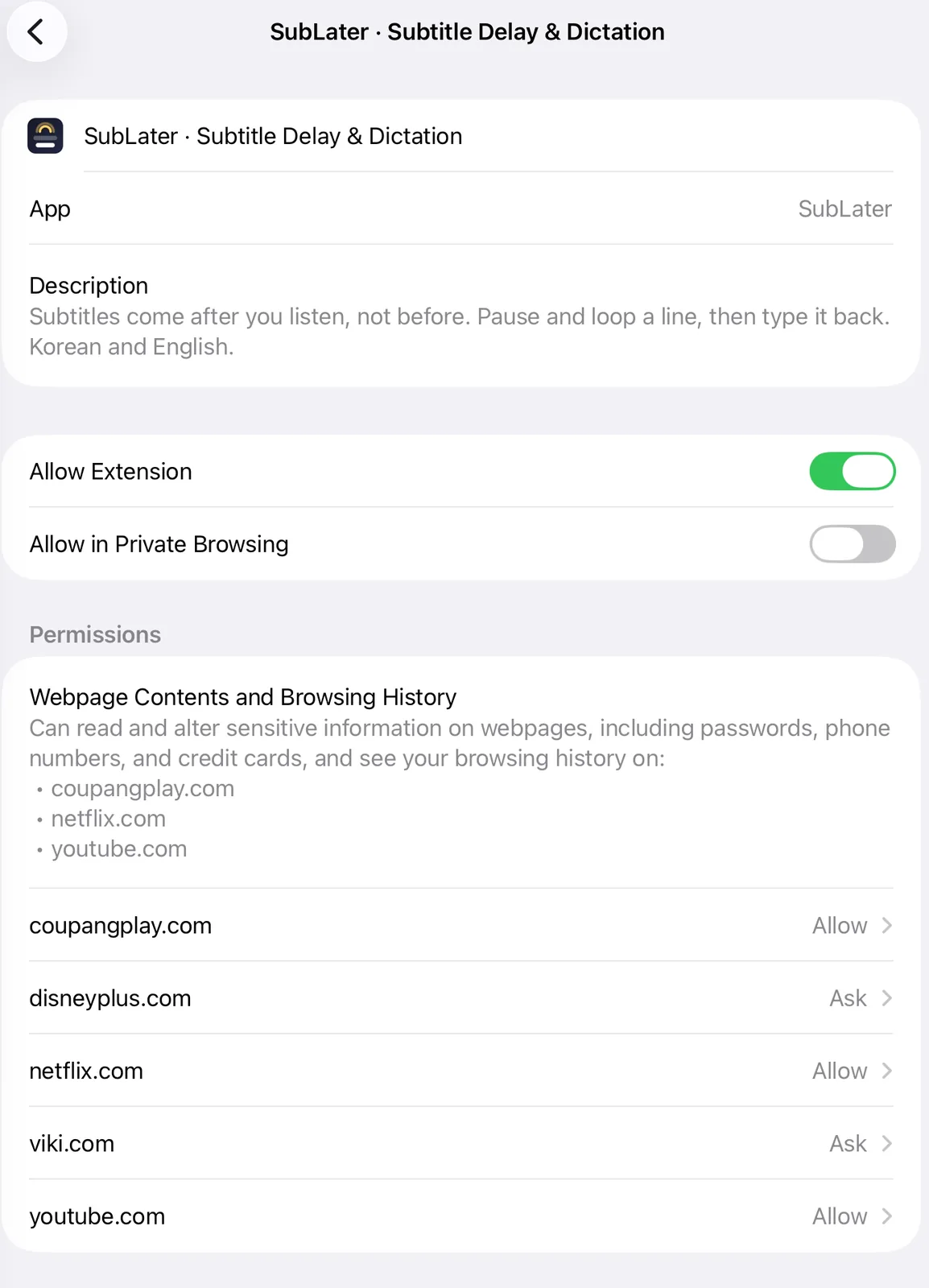
You’re set when the site says “Allow” on the right. - Type netflix.com into Safari’s address bar, or tap the Netflix button in the SubLater app. A Netflix link tapped anywhere else opens the Netflix app. If the app opens, tap the site address in the status bar at the top of the screen once; from then on it opens in Safari.
- If a permission banner appears, open it, choose “Always Allow…”, then “Always Allow on This Website”. “Allow for One Day” stops working the next day.
- Start a title and pick Korean (or English) in Netflix’s subtitle menu.
- The other language appears on a line underneath. If it doesn’t, tap the small arrow (⌃) at the right edge of the video, open ⋯ and turn on the “Dual subtitles” switch.
Why it doesn’t work in the Netflix app
SubLater is a Safari extension. An extension attaches to pages opened in Safari and can’t reach inside another app, so the Netflix app keeps showing one subtitle. For two lines on iPad, open Netflix in Safari.
Both lines arrive a beat late, on purpose
SubLater’s main job is to show subtitles a beat after the audio (2.0 s on the free plan), so you hear each line before you read it. The second line arrives late together with the main one. Nothing is broken.
If you just want both subtitles in real time, turn the delay off: tap the SubLater icon in Safari’s address bar and set “Delay” to “Off · 0s”. If you don’t see the icon, tap the puzzle-piece icon in the address bar and choose SubLater. 0 s is free too.
If the second line doesn’t show
- Check Netflix’s subtitle menu for both Korean and English. If the title lacks one of them, there is no second line.
- Make sure you aren’t in the Netflix app. If you can see an address bar, you’re in Safari.
- Check that netflix.com is set to “Allow” in Settings. On “Ask” or “Allow for One Day” it stops. Reload the tab after changing it.
- Right after playback starts, the second line can take a few seconds to attach.
iPhone, Android tablets and other services
- iPhone: not for Netflix. Netflix doesn’t play in the iPhone browser. On iPhone, SubLater works on YouTube only.
- Android tablets such as Galaxy Tab: it can’t be installed.
- Other services on iPad: YouTube and Coupang Play work the same way. Disney+ doesn’t work on iPad.
- Mac: the same app works in Safari, Disney+ included.
- Chrome or Whale on a computer: use the extension. See Netflix with Korean and English subtitles at the same time.
Go one line at a time
With both lines on screen you can also stop after every line. Tap the arrow (⌃), open ⋯ and turn on “Pause after each line”: the video stops when each subtitle line ends. Tapping a word shows its meaning. The full walkthrough is in Shadowing English on iPad Safari.
Which languages?
SubLater is built for Korean ↔ English. The second subtitle line, word meanings and dictation scoring cover those two languages only.
Free and Pro
The app doesn’t lock after the 14-day trial. Dual subtitles, delay on/off (2.0 s), line jumps and loops, pause after each line and word meanings stay free, with 10 dictation lines a day (counted when scored). Pro adds an adjustable delay (0–5 s), Reveal mode, the sound line and unlimited dictation. It’s an in-app subscription, monthly or yearly, priced in the App Store. It renews unless cancelled at least 24 hours before the period ends; manage it in your App Store account settings. Pro bought on sublater.com (for Chrome and Whale) doesn’t carry over to Safari.
FAQ
Is there really no two-subtitle setting in the Netflix app?
No. In the app and on the web, Netflix lets you choose one subtitle language at a time. The second line is added by SubLater in Safari.
Is the second line machine-translated?
No. It is the subtitle track Netflix already provides for that title, which is why a title without that track gets no second line.
Can I pair other languages, like Japanese and English?
No. Dual subtitles cover Korean and English only.
Do I need a keyboard?
No. Everything is on the buttons that open from the arrow (⌃) at the right edge of the video and in the ⋯ menu.
Full 14-day trial — the core features stay free after that.
On Chrome? Install free from the Chrome Web Store.